
As customer communication increasingly shifts to messaging apps, businesses are encountering a new challenge: how to handle complex support issues that require a voice conversation without forcing customers off their preferred platform.
The solution is WhatsApp Cloud API Calling (often referred to as WABA calling)—and the WaaPY platform now fully supports this feature natively.
By integrating voice calls directly into the WhatsApp Business API via WaaPY, companies can transform their standard WhatsApp number into a fully functional, multi-agent call center. Whether you are looking to manage high call volumes, record customer interactions, or understand Meta’s pricing structure, this guide covers everything you need to know about setting up and utilizing WhatsApp voice features.
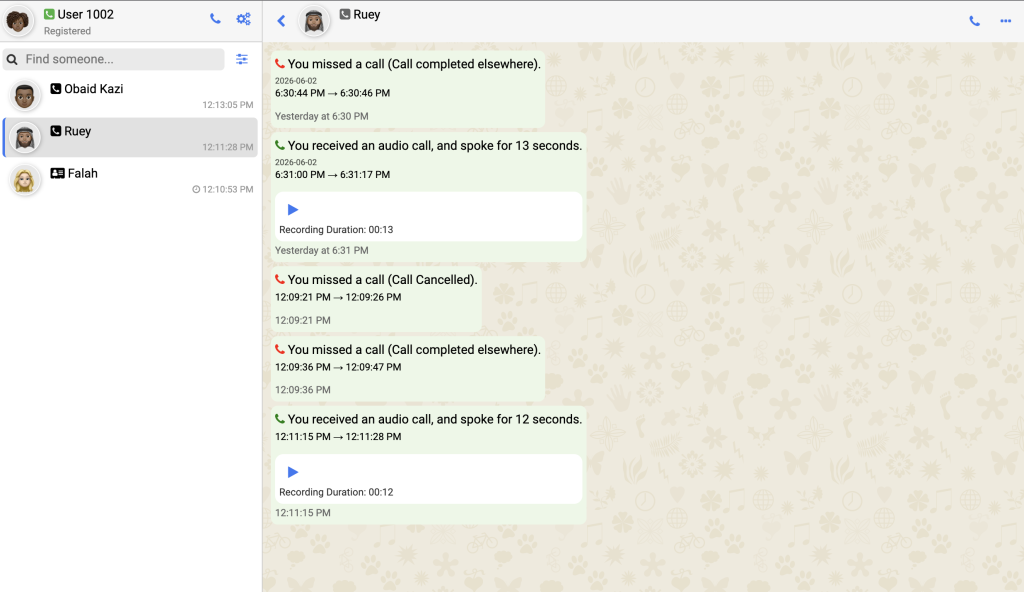
📞 How a WhatsApp Call Center Works: Essential Features
Using the standard WhatsApp Business app on a single mobile phone is entirely inadequate for scaling teams. By leveraging WaaPY to access the WhatsApp Cloud API, businesses unlock enterprise-grade telephony features tied directly to their official WhatsApp number.
Multiple Agents on One WhatsApp Number
The most searched-for requirement for growing businesses is the ability to have multiple staff members manage a single WhatsApp account. WaaPY’s WABA calling allows multiple users to handle incoming and outgoing calls simultaneously. PYIf three customers call your WhatsApp number at once, three different support agents can answer those calls from their respective Waa dashboards—eliminating bottlenecks and abandoned calls.
Seamless Call Transfers
When a customer has a highly technical question, the frontline agent shouldn’t have to hang up and ask them to call a different number. WaaPY allows for real-time call routing. Agents can place the customer on hold and transfer the active call directly to the appropriate department, team member, or specialist, ensuring a frictionless resolution.
Automated Call Recording
For quality assurance, dispute resolution, and training purposes, WABA calling through WaaPY supports automatic call recording. Supervisors can easily review past conversations within the platform to ensure compliance and improve team performance, treating WhatsApp calls with the same rigor as traditional phone support lines.
Comprehensive Call Logs & Missed Call Management
Data visibility is critical. Every interaction—inbound, outbound, connected, and missed—is logged directly within the customer’s chat thread inside WaaPY. If an agent misses a call during a peak rush, the system logs it, allowing the team to easily trigger a call back to the customer with a single click. No lead or inquiry is left unanswered.
Business Hours Control (Enable/Disable Calls)
You don’t want your customers ringing an unattended line at 2:00 AM. A crucial feature of API calling is the ability to dynamically enable or disable the call functionality based on your operating hours. Through WaaPY’s dashboard, when you disable calling for off-hours, the phone icon physically disappears from the customer’s WhatsApp interface, gently guiding them to leave a text message instead of waiting on an unanswered ringing line.
WhatsApp Cloud API Calling Pricing Explained
Understanding Meta’s billing structure is vital for forecasting your communication budget. Meta has designed the WhatsApp Cloud API calling pricing to heavily favor businesses providing inbound support.
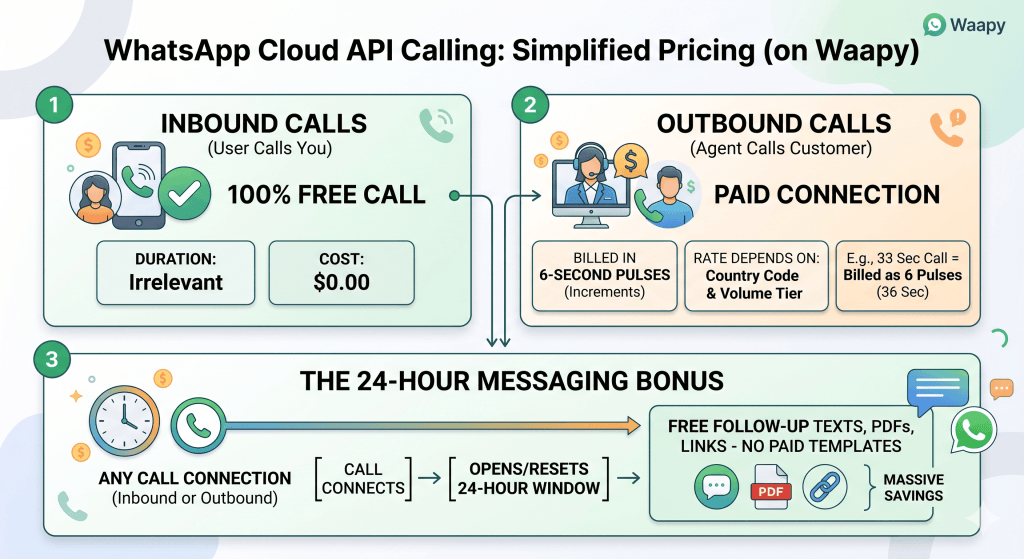
Here is how the billing works:
- User-Initiated Calls are 100% Free: When a customer taps the call button in their WhatsApp app to contact your business, Meta does not charge you for the duration of that call.
- Business-Initiated Calls are Paid: If your agent initiates an outbound call to a customer via WaaPY, you are billed for the connection.
- Pulse Billing: Outbound calls are not billed by the minute; they are billed in six-second pulses. For example, a 33-second call is billed as 6 pulses (36 seconds).
- Variable Rates: The cost per pulse depends on two factors: the destination country code of the customer you are calling, and your monthly volume tier (the total minutes your business calls per calendar month). Check out the pricing tier by country in here – WhatsApp Cloud API calling rate
- The 24-Hour Window Benefit: WhatsApp operates on a strict 24-hour customer service window for messaging. Any connected call—whether inbound or outbound—automatically opens or refreshes this free 24-hour messaging window. This is a massive advantage; it means your team can follow up a phone call with free text messages, PDF receipts, or tracking links without having to pay for a pre-approved template message.
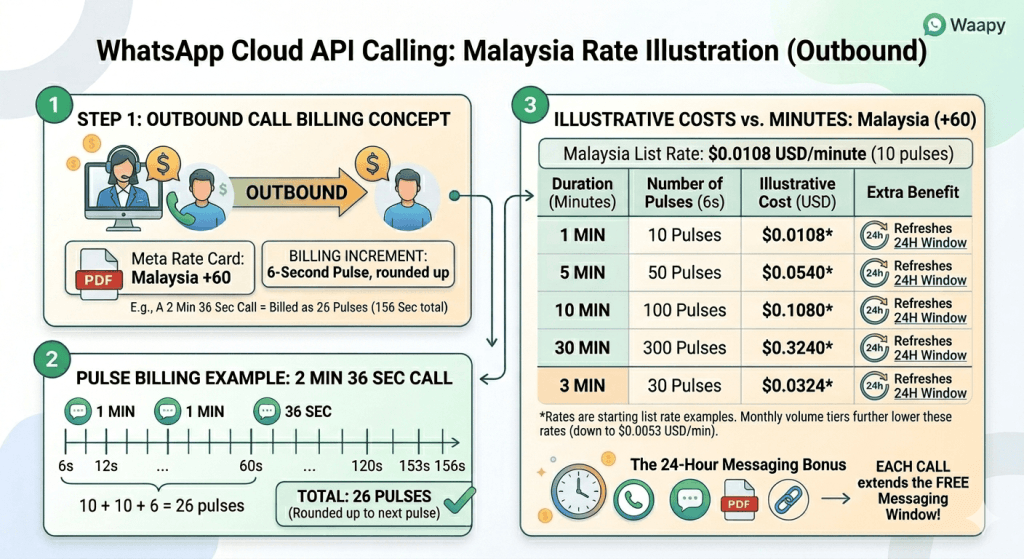 Illustration of the rate for each minutes outbound call with WhatsApp Cloud API.
Navigating Meta’s WhatsApp Cloud API Call Review Guidelines
Before deploying these features, software providers and businesses must adhere strictly to Meta’s App Review Guidelines for Calling.
Meta’s primary focus is user experience and preventing spam. Key compliance requirements include:
Programmatic Call Toggling
Meta mandates that your API provider must be able to programmatically hide the call button. If your business cannot accept calls (due to technical routing limits or being outside business hours), the button must be hidden to prevent a poor customer experience. WaaPY handles this toggle natively in the dashboard to ensure compliance.
Clear Routing
You must have a clear infrastructure in place to route inbound WebRTC (voice) traffic to your agents efficiently. WaaPY’s multi-user routing ensures incoming streams are reliably assigned to active agents.
No Automated Robocalling
Business-initiated calls should be handled by human agents. Using automated systems to spam outbound voice calls violates WhatsApp’s commerce and API policies.
By utilizing WaaPY to access the WhatsApp Cloud API integration, your business can turn the world’s most popular messaging app into a powerful, multi-channel support center while remaining completely aligned with Meta’s strict technical guidelines.