
WhatsApp has begun requiring a passkey to link new devices on some accounts — and if your business runs WhatsApp across several screens, on WhatsApp Web, or through an automation tool, this change can quietly break the setup you rely on every day. Here’s what’s happening, who’s affected, and what you can do about it.
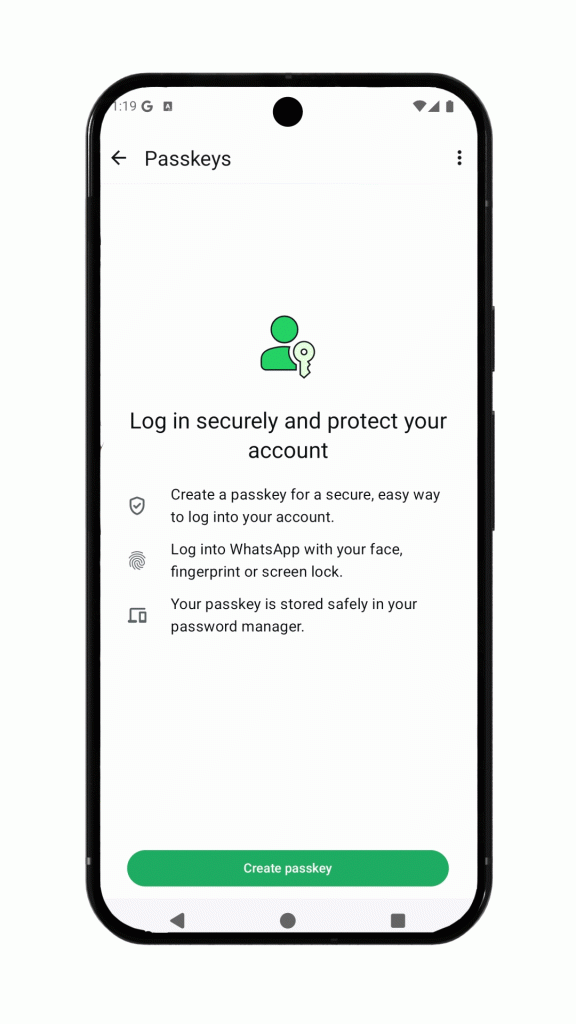
 After scanned the QR code to linked device, it will popup the button that require Whatsapp user to authenticate via passkey before proceed.

Your whatsapp app will need you to validate the passkey from your PC device, otherwise you are not able to continue from your phone.

if you don’t have passkey added to you whatsapp app by default, it will force you to create one otherwise you can’t proceed.
What just changed
On 25 August 2026, WhatsApp published a blog post celebrating that more than a billion people now use passkeys, alongside a few other account-security upgrades: a stronger two-step verification password (moving from a 6-digit PIN to a longer alphanumeric one) and more caller context on Android.
Here’s the important nuance most people miss: that announcement is about logging in to your account. It does not, on its own, mention device linking, WhatsApp Web, or business accounts at all. The change that’s actually disrupting businesses is a separate, quieter rollout happening in the same period — WhatsApp has begun extending passkeys into the device-linking flow itself.
In plain terms: on affected accounts, scanning the QR code to connect WhatsApp Web (or another companion device) is no longer enough. After the scan, the phone now asks you to confirm the connection with a passkey before the link completes. No passkey, no link.
What exactly is a passkey?
A passkey is a passwordless login method. Instead of typing a password or a code sent by SMS, you prove it’s really you with the security already built into your device — your fingerprint, your face (Face ID / Touch ID), or your screen-lock PIN.
Technically, it’s a pair of cryptographic keys. One half stays locked on your device (on iPhone it lives in the iCloud Keychain; on Android, in Google Password Manager), and the other half sits on WhatsApp’s servers. When you log in, the two are matched without any secret ever travelling over the network. That’s what makes passkeys strong against phishing and SIM-swap scams — there’s no code for an attacker to steal or trick out of you.
For everyday personal use, that’s genuinely a good thing. The friction starts when the same mechanism is applied to linking devices for a business.

Why this hits businesses hardest
Most consumers link a device once — their laptop — and rarely touch it again. Businesses are the opposite. A typical WhatsApp Business setup leans on linked devices constantly:
- A sales or support team sharing one number across several WhatsApp Web sessions on different computers
- Staff who re-link WhatsApp Web every morning on a shared or rotating machine
- A number connected to a CRM, helpdesk, or chatbot so conversations flow into one system
- Owners who link the account to a second phone or a tablet at the counter
Every one of those depends on the device-linking flow working smoothly. The moment WhatsApp inserts a mandatory passkey step — one that needs a human to complete a biometric or screen-lock confirmation on the phone — re-linking stops being a 10-second QR scan. For a solo owner that’s an annoyance. For a team running on automation, it can mean the integration simply stops connecting.
Does it affect every kind of linking? What we’re seeing
This is the question most business owners are asking us, so let’s be precise — and honest about where the evidence is solid and where it isn’t.
The passkey step is clearly centred on the browser / WhatsApp Web flow. The confirmation has to happen in the correct WhatsApp browser context on web.whatsapp.com. That’s where affected users are seeing the “confirm with a passkey” prompt after scanning.
The WhatsApp Desktop app appears to behave differently — for now. Developers investigating the rollout have noted that the Desktop app does not currently show the same passkey security-check screen that the browser does, suggesting its linking flow may run on a different path. Linking a second phone as a companion device also hasn’t shown the same hard passkey wall so far.
Two important caveats, because this matters and WhatsApp hasn’t published the full scope:
- This is a gradual, partial rollout. What’s true on one account today may not be true on another, and behaviour can change without notice.
- “Desktop doesn’t trigger it yet” is an observation, not a guarantee. If WhatsApp decides to widen enforcement, the desktop and companion-phone paths could be next.
So as of early November 2026: if you link through a web browser, you’re the most likely to hit the passkey requirement. If you use the Desktop app or a second phone, you’re more likely to be unaffected today — but don’t build your whole operation on the assumption that it will stay that way.
It’s not rolled out to everyone — yet
The single most important thing to understand: this is not a universal switch that flipped for all users on one day. WhatsApp is enabling the passkey-linking requirement gradually, account by account. Some business numbers already see it; many still don’t. If your linking still works normally today, that doesn’t mean you’re exempt — it means your turn hasn’t come.
Based on what we at WaaPY are seeing in the field, it appears to be reaching WhatsApp Business users progressively, and we suspect the accounts being switched on earlier tend to be business numbers already connected to Meta Business Suite or the official Business ecosystem. We want to be upfront that this is our own observation from working with clients — WhatsApp has not published its rollout order, and we haven’t seen it confirmed anywhere official. Treat it as a pattern worth watching, not a settled fact.
The practical takeaway is the same either way: assume it’s coming to your account, and plan before it does rather than after your integration breaks.
The biggest hit: unofficial third-party integrations
If your business connects WhatsApp to another system — a chatbot, a CRM, a bulk-sender, an auto-reply tool — through an unofficial integration, this is where the pain is sharpest.
Many third-party WhatsApp tools, both international and here in Malaysia, are not built on Meta’s official API. Under the hood they rely on open-source libraries such as Baileys, whatsapp-web.js and OpenWA, which work by automating a WhatsApp Web session for you. When WhatsApp added the passkey step to that web flow, these tools started failing — returning connection errors because a headless server cannot perform the biometric or screen-lock confirmation a passkey demands. The QR scan succeeds, the phone says “continue on your other device,” and then nothing completes on the tool’s side.
In short: if the vendor you use links your number by quietly running WhatsApp Web in the background, a passkey-enforced account can stop that vendor from connecting at all. This isn’t a bug in their software — it’s WhatsApp deliberately closing the door that unofficial tools walk through.
The official WhatsApp Business Platform (Cloud API) is unaffected, because it never uses the companion-device linking flow in the first place. That distinction is central to the next point.
Genuine security — or a push toward paid WABA? Our honest take
We’re laying out what we see and letting you draw your own conclusion.
There’s no doubt passkeys are a real security upgrade for personal login. Device-linking scams — where a victim is tricked into scanning a QR code that hands their account to an attacker — are a genuine problem, and a passkey confirmation does make that harder.
But here’s what gives us pause. If the goal were purely security, you’d expect the requirement to apply evenly to every way of linking a device — browser, desktop app, and second phone alike. What we’re actually seeing is a requirement concentrated on the web-browser flow: precisely the path that unofficial third-party tools depend on, while the desktop app and companion phones have so far been left largely alone.
That pattern is hard to ignore. The web flow is also the one Meta cannot monetise. Meanwhile, Meta’s official route — the WhatsApp Business Platform — is a paid product that now charges businesses per message. So it’s fair to ask: is closing the unofficial web door really about protecting users, or is it about steering businesses off free workarounds and onto the paid official API, where Meta earns on every conversation?
We don’t claim to know Meta’s intent, and we won’t pretend to. But when a “security measure” happens to break exactly the free alternatives to a company’s paid product — and spares the paths that don’t compete with it — business owners are right to look at it with a sceptical eye.
What you can do now
You have options — ranging from quick stop-gaps to a proper long-term fix.
- Check how you currently link. If you rely on WhatsApp Web in a browser, you’re the most exposed. Where it suits your workflow, linking through the WhatsApp Desktop app or a second phone may avoid the passkey wall for now (see the caveats above — this can change).
- Set up your passkey deliberately, and keep the phone handy. If a passkey is going to be required, have it properly configured under Settings → Account → Passkeys, and make sure a team member with the primary phone is available to complete the confirmation when a device needs re-linking.
- Plan your move to the official WhatsApp Business Platform (Cloud API). This is the durable answer. The Cloud API never touches the companion-linking flow, so passkey enforcement doesn’t affect it. Yes, it’s a paid, per-message model — but for any business that depends on automation, it removes this whole category of risk.
- Talk to the WaaPY team. This is the fastest way to stay running. WaaPY’s platform is built to work with the new passkey linking step rather than break on it — we can keep your third-party integration connected through the passkey confirmation, and help you weigh when it makes sense to move to the official API. If your current vendor’s connection has stopped working, or you want to get ahead of the rollout before it reaches you, reach out and we’ll map the right path for your setup.
The worst position is to do nothing and discover the problem the morning your integration goes dark. A little planning now saves a scramble later.
Sources
- WhatsApp Blog — One billion people are now protected with passkeys, plus more account security features (25 Aug 2026)
- WhatsApp Help Centre — About passkey linking on WhatsApp Web
- Developer discussion — passkey/WebAuthn enforcement in the device-linking flow and desktop behaving differently (OpenWA issue)
Accurate as of 6 November 2026. This is a gradual, partially documented rollout; WhatsApp has not published its full scope, and behaviour may change. Where this post marks something as our observation or opinion, it is exactly that.