
Chats, calls and your CRM on one business number — walked through with a single aircon-servicing job, from the customer’s first message to the quotation PDF.
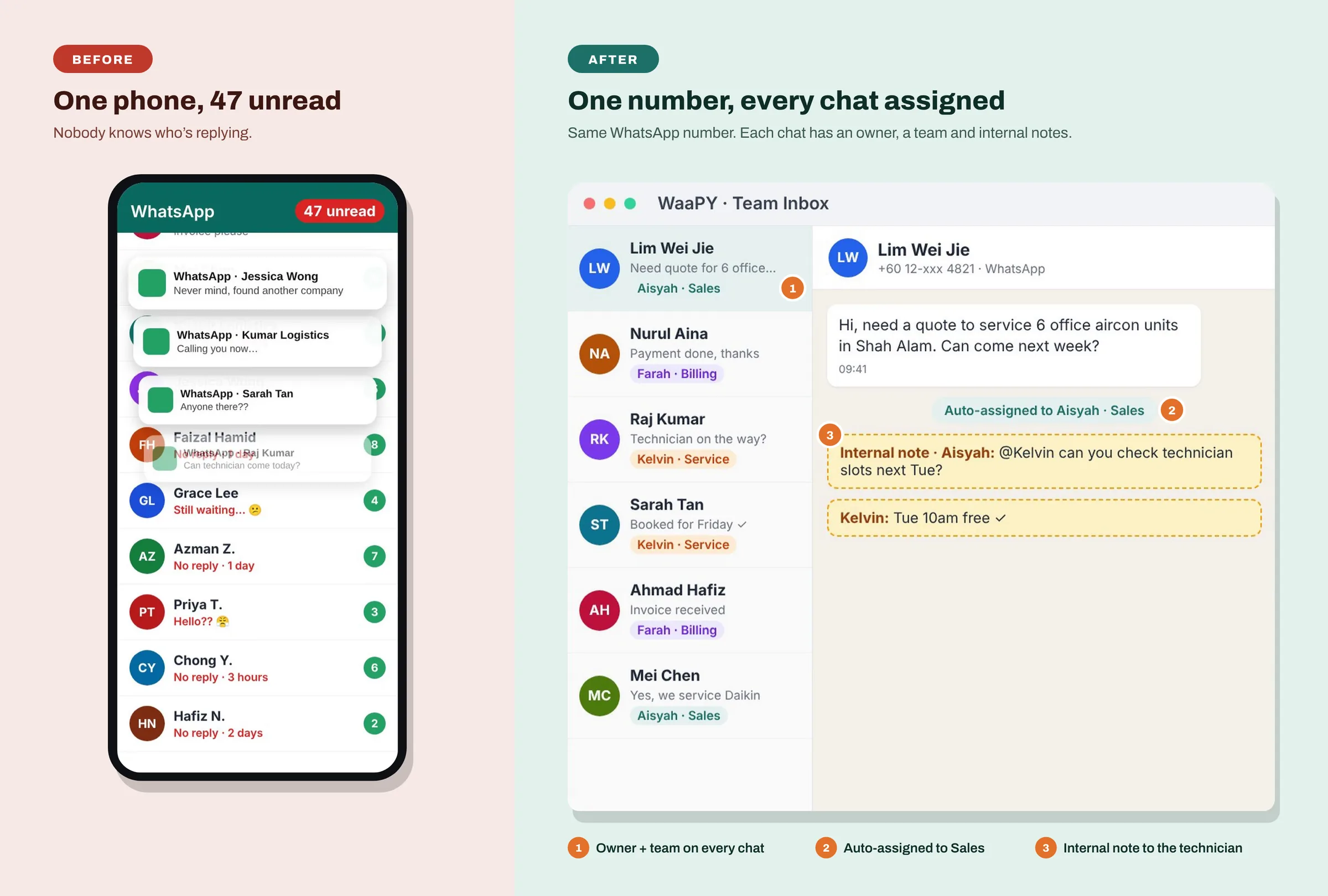
Picture a small aircon-servicing company in Shah Alam. Business is good. The WhatsApp phone on the front desk shows 47 unread.
Lim Wei Jie needs a quote for six office units.
Nurul Aina has paid and wants confirmation.
Raj Kumar asks if the technician is on the way. No reply — 2 hours.
Kumar Logistics: No reply — 1 day.
Jessica Wong: No reply — 5 hours. Then a new notification: “Never mind, found another company.”
Grace Lee: “Hello?? Anyone there?”
Three staff can read that phone. Nobody knows who is replying to whom. Someone answers a customer another colleague already answered. Someone else promises a Tuesday slot the technician doesn’t have. And while they’re typing, the phone rings — a WhatsApp call — and nobody picks up because nobody is holding the phone.
This isn’t a staffing problem. It’s a one-phone problem. Here’s how to fix it without changing your number.
In this guide
The short answer
Keep your one WhatsApp business number, and put four things behind it:
1
A shared team inbox
Every chat is assigned to one person, with labels and internal notes.
2
WhatsApp calling in the same inbox
Customers call your WhatsApp number; whoever is free answers from their computer.
3
CRM sync
Every chat and call lands on the customer’s record automatically.
4
Automation with n8n or the API
The repetitive steps after a conversation — update the deal, make the quotation, send it, tell the technician — run on their own.
Customers see one number. Your team sees an organised workload.
Signs you’ve outgrown the shared phone
If three or more of these are true, it’s time:
- Staff pass the phone around, or take turns being “on WhatsApp”.
- Customers send “Hello??” or “Anyone there?” more than once a day.
- Two people reply to the same customer with different answers.
- You can’t tell who promised what, or when.
- WhatsApp calls go unanswered because the phone is in someone’s drawer.
- Customer history lives in one person’s phone. When they’re on leave, it’s gone.
- Someone retypes WhatsApp details into your CRM or quotation template at the end of the day.
The WhatsApp Business app is built for one person on one phone. Linked devices let a few people read the same chats, but there’s no assignment, no internal notes and no record of who handled what. That’s where a platform on the official WhatsApp Business API comes in. (If you’re unsure which you need, our WhatsApp Business App vs API guide covers when to switch.)
Piece 1 — A shared inbox where every chat has an owner
The core change is simple: every conversation belongs to someone.
Here’s what Lim’s message looks like in a shared inbox:
Lim Wei Jie, 09:41: Hi, need a quote to service 6 office aircon units in Shah Alam. Can come next week?
Auto-assigned to Aisyah · Sales
Aisyah owns the chat. Down the list, Nurul Aina’s payment question sits with Farah · Billing, and Raj Kumar’s “technician on the way?” is with Kelvin · Service. Nobody wonders whose turn it is.
Then the part customers never see — an internal note:
Internal note · Aisyah: @Kelvin can you check technician slots next Tue?
Kelvin: Tue 10am free ✓
Two colleagues sorted out the schedule inside the conversation, without a separate group chat, and without the customer seeing the back-and-forth. Two minutes later:
Aisyah, 09:43: Hi Mr Lim, yes we can! Tuesday 10am works. Let me call you to confirm the details.
What to set up
- Assignment rules. Route by keyword, by team or round-robin. New quote requests to Sales; “paid”, “receipt”, “invoice” to Billing; “technician”, “service” to Service.
- Labels that match how your team actually works — Sales, Billing, Service — not twenty categories nobody maintains.
- Internal notes and @mentions, so questions to colleagues stay attached to the customer.
Piece 2 — WhatsApp calls answered from the inbox
Malaysians call on WhatsApp all the time. If your business number is WhatsApp-only, those calls ring on one phone — or nowhere.
With WhatsApp calling in the inbox, the customer calls your business WhatsApp number as usual. The call rings in the team inbox, inside the same conversation:
Incoming WhatsApp call · Lim Wei Jie — Decline / Answer
Aisyah answers from her computer. The call timer runs on screen, with the chat history and Kelvin’s “Tue 10am free” note right there, so she doesn’t have to put the customer on hold to check anything.
A few facts worth knowing about WhatsApp calling on the official platform, from Meta’s Calling API documentation:
Calls the customer makes to you are free
Meta states that all user-initiated calls are free.
To call a customer, you need their permission first
Business-initiated calls require the customer to grant call permission — for example, by accepting a permission request, or by calling you first if callback permission is enabled.
Unanswered calls have consequences
Repeated unanswered business-initiated calls lead WhatsApp to prompt the customer to reconsider, and eventually revoke the permission. Call people who expect it.
Recording requires an announcement
Meta’s call recording and transcription features include a required announcement to the customer.
In WaaPY, the WhatsApp calling feature supports incoming and outgoing calls, transfers to a colleague and recordings — so if Aisyah’s call turns technical, she can transfer it to Kelvin without the customer redialling.
Piece 3 — Every chat and call on the customer’s CRM record
By the end of that morning, Lim’s record in the CRM looks like this — and nobody typed it in:
| Field | Value |
|---|---|
| Contact | Lim Wei Jie · Owner: Aisyah |
| Company | Lim Engineering Sdn Bhd |
| Lead source | WhatsApp (WaaPY) |
| Deal | Aircon servicing · 6 units |
| Stage | Quote requested |
And under Activity:
- WhatsApp chat · 4 messages — Quote request: 6 aircon units, Shah Alam
- WhatsApp call · 02:14 — Summary: 6 × 1.5hp wall units, servicing Tue 10am, needs quotation today
That call summary is the line that saves the most time. When someone else picks up the job next week, they read three lines instead of asking Aisyah what was said.
WaaPY syncs with Zoho, or any CRM with an API or webhook. If you don’t use a CRM yet, WaaPY’s built-in sales pipeline covers the basics.
Piece 4 — Automate the rest with n8n (no coding)
After the call, there are four boring steps left: update the deal, make the quotation, send it to the customer, and tell the technician. Each one is a chance to forget something.
With WaaPY’s n8n integration, they run as one workflow:
- WaaPY trigger — call ended, deal info attached
- CRM: update deal — stage moves to Quote sent
- Generate quotation — 6 units × RM90, as a PDF
- WaaPY: send PDF — to the customer’s WhatsApp
- Notify team — “Kelvin: job Tue 10am”
In the demo, the whole workflow completes in 4.2 seconds. Lim receives:
Cool Air Services: Hi Mr Lim, here’s your quotation for servicing 6 aircon units. See you Tue, 10am!
📄 Quotation-Q1024.pdf
Lim: Received, thanks! 👍
n8n connects to hundreds of other tools — accounting, Google Sheets, calendars, job-dispatch apps — so the same pattern works for invoices, booking confirmations or warranty reminders. No developer needed for the common ones; WaaPY’s REST API is there for anything custom.
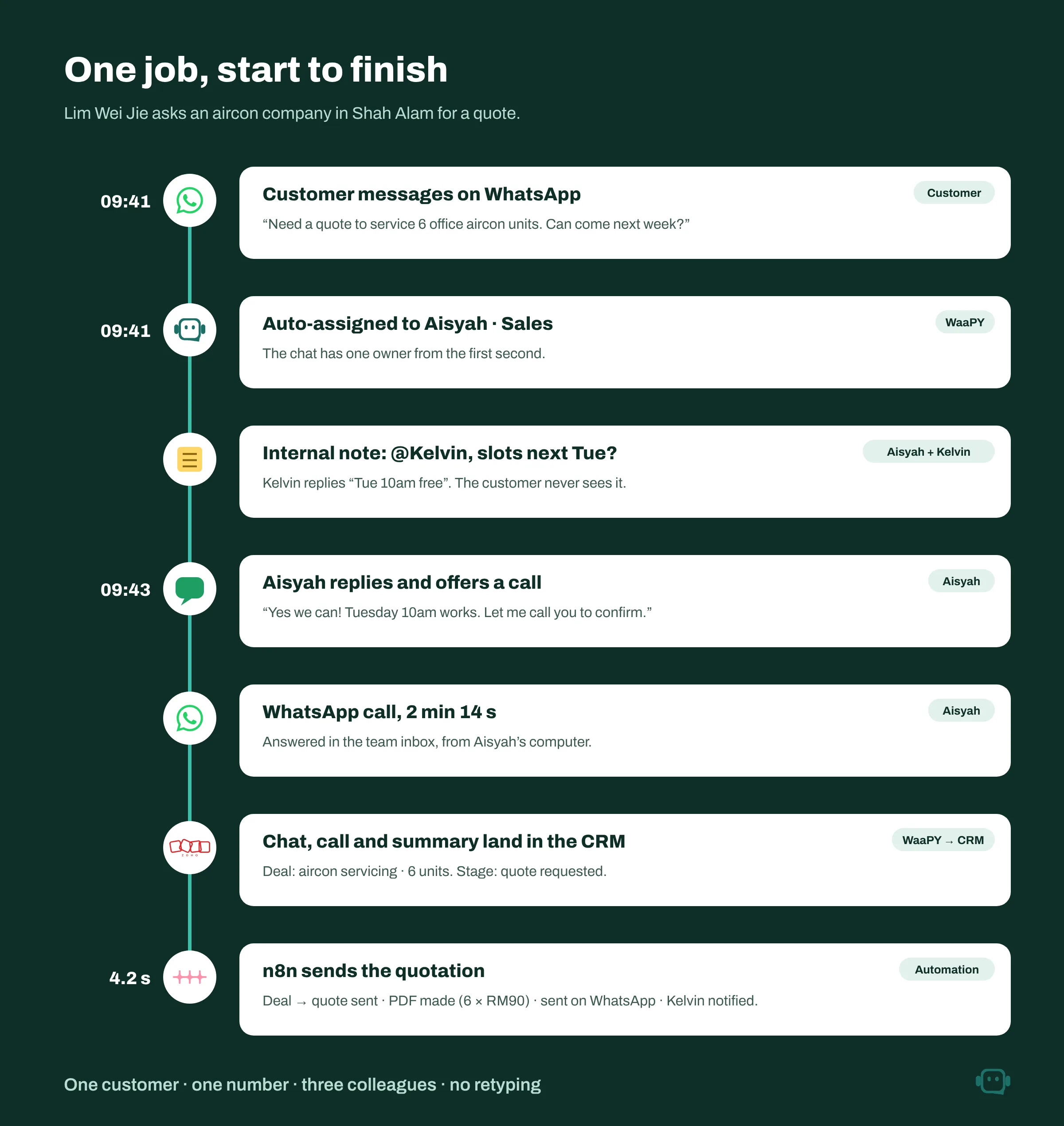
One job, start to finish
Here’s Lim’s whole journey in one view:
| Time | What happened | Who did it |
|---|---|---|
| 09:41 | Lim asks for a quote on WhatsApp | Customer |
| 09:41 | Chat auto-assigned to Aisyah · Sales | WaaPY |
| Before 09:43 | Aisyah asks Kelvin about Tuesday in an internal note | Aisyah |
| Before 09:43 | Kelvin confirms “Tue 10am free” | Kelvin |
| 09:43 | Aisyah replies and offers a call | Aisyah |
| Shortly after | WhatsApp call, 2 min 14 s, answered in the inbox | Aisyah |
| After the call | Chat, call and summary appear on Lim’s CRM record | WaaPY |
| After the call | Deal updated, quotation generated and sent, Kelvin notified | n8n workflow |
The result
One customer, one number, three colleagues, no retyping and nothing forgotten.
How to roll this out in a week
You don’t need a big migration. A sensible order:
- Day 1 — Connect your number to the WhatsApp Business API through WaaPY. Keep the same number your customers already have.
- Day 2 — Set up teams and labels. Start with three or four. Add assignment rules for the obvious keywords.
- Day 3 — Turn on WhatsApp calling and decide who answers calls during business hours.
- Day 4 — Connect your CRM (or start with WaaPY’s built-in pipeline).
- Day 5 — Build one n8n workflow for your most repetitive after-chat task. Quotations and booking confirmations are good first choices.
- Week 2 — Review. Look at unanswered chats, average first-reply time and missed calls. Adjust the routing.
One rule for the team
If it’s assigned to you, it’s yours until it’s closed or handed over with a note.
Bring it together with WaaPY
Chat, calls and your systems — all connected:
- Shared team inbox
- WhatsApp calling
- Zoho and any CRM sync
- n8n and API automation
Book a free 20-minute demo → We’ll set it up around your own team and workflow.
Related reading
